
Case study · healthcare
Online appointment booking
for Sheba Medical Center
The patient does not pick a calendar or an appointment type — they answer a few questions about what they need, and the system finds them the right appointment.
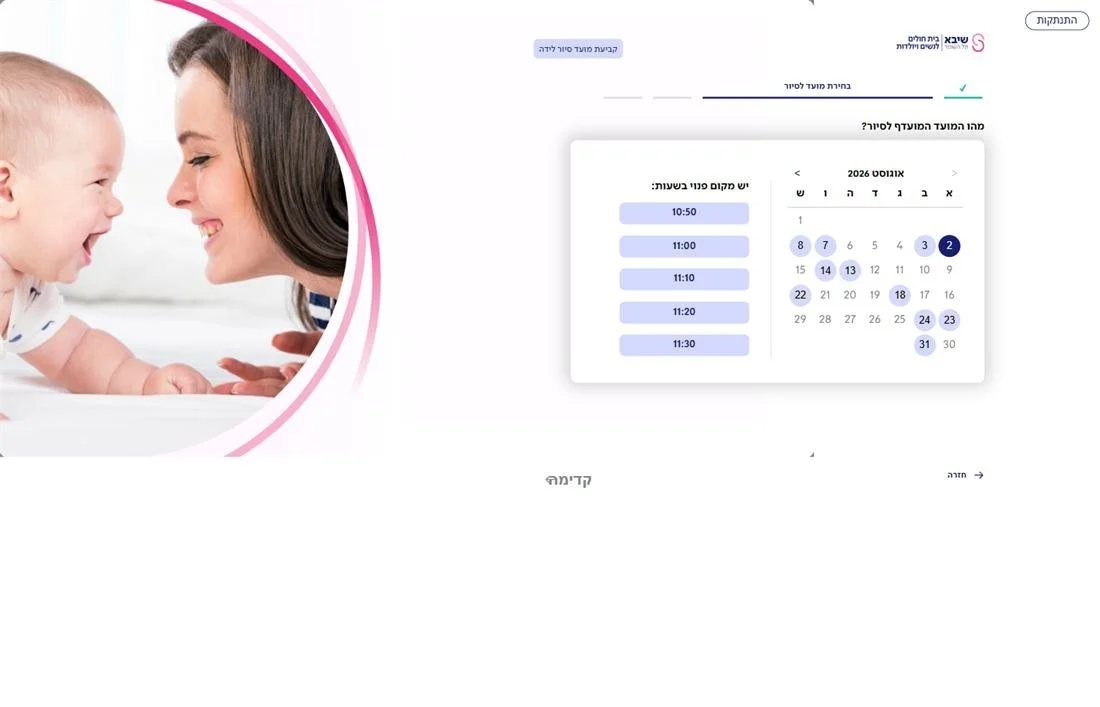
To book an appointment online, the patient is usually expected to know things only the clinic secretary knows: which calendar they belong to, what the appointment type is called, and which document to bring. Whoever does not know picks up the phone and calls the call centre.
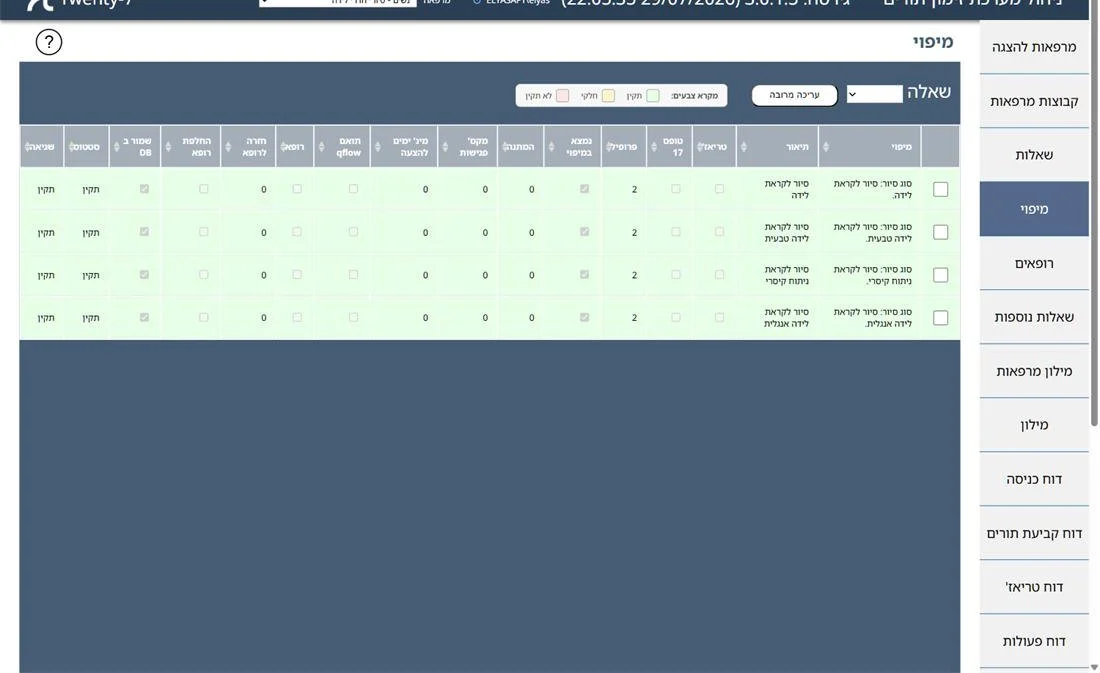
At Sheba we built it the other way round. The patient is asked about what they need — the reason for the visit and the type of service — and the sequence of answers is translated into a mapping: a definition that determines which calendars to search, which appointment type to book, which documents to require, and whether self-service booking is allowed here at all.
The questionnaires and the mappings are built in the admin system, per clinic, without writing code. A new clinic goes live through configuration, not through a release.
What the patient does
Everything from the browser, with no call centre and no opening hours.
Verifies identity against two registries
ID number and date of birth are checked against the hospital's patient registry and against the national population registry, and then a one-time code verifies that the phone is actually in the patient's hands. Both layers — the registry identification and the phone verification — are required so that medical information is not exposed to someone guessing an ID number.
Answers a questionnaire, and gets an appointment
Each question opens according to the answer to the previous one. At the end of the sequence the system knows which calendar to turn to, pulls the available slots from Q-Flow in real time, and shows a calendar with the days and times that can be booked.
Picks a doctor — or returns to their own
Doctor cards with a photo, a role and each doctor's nearest appointment. And if the patient has been here before, the system recognises the doctor from the previous visit and shows only that doctor's calendar, within a day window configured for the clinic.
Manages what is already booked
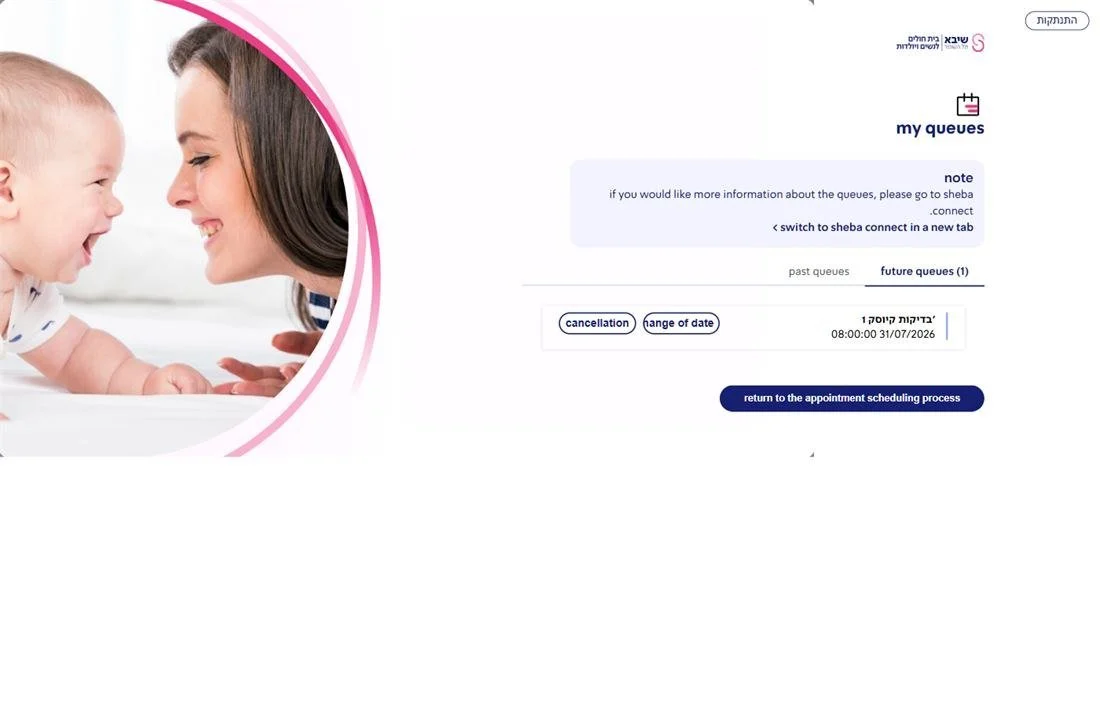
A "My appointments" screen: a year back read-only, a year ahead with actions. Changes and cancellations are made from the site, from this screen, or from an identified link sent by the hospital's systems — the bot or Sheba Connect.
Uploads the required documents
Form 17 and triage uploads — before booking the appointment or after it, according to what the mapping of that service requires. The files go on to the hospital's scanning service.
Joins a waiting list
No appointment soon? The patient registers, and a background service keeps searching. When a suitable slot opens up, an SMS with a personal link is sent, to book the appointment.
What the hospital gets
A new service without a software release
The clinic's own staff set up a service, change wording or add a question to a questionnaire — in an admin system of some 40 screens covering clinics, questionnaires, mappings, a dictionary, doctors, email templates and reports. A content change goes live at once.
Permissions by role
An administrator sees everything; a content editor gets a reduced menu of questionnaires, mappings and the dictionary; a report viewer sees reports only. The menu is built from what the account is actually allowed to do.
Reports on every action
A sign-in report and an actions report — who signed in, what was booked, what was cancelled and when. When a clinic manager asks why slots stayed empty, there is data that answers it.
A look per clinic
A clinic can get a look of its own, and a link that leads straight to it — so it embeds appointment booking in its own site without sending the patient to wander through a menu.
More of what the system does
Telemedicine
A service delivered remotely is identified as such, the patient is asked whether they prefer a call, and their phone is verified for it.
Duplicate prevention
When an appointment for the same service already exists, the system blocks another booking instead of creating needless load on the calendar.
The phone first
The screens were built for a phone-width display first, and only then for a large screen.
What it changed
A patient who can describe what they need gets an appointment without knowing the hospital's calendar structure, and without waiting for the call centre. A clinic that changes a procedure updates the questions and the mappings from the admin system. And a slot that opens up reaches the person waiting for it, instead of staying empty.
The system is live, and every capability described here runs in production.
Not an off-the-shelf product — but not from scratch either
The system was built for Sheba and is connected to its systems: Q-Flow as the appointment store, the hospital's patient registry for identification, and the scanning service for documents. It is tailored to Sheba in depth, and we will not sell it as an off-the-shelf product.
But the skeleton is relevant to any healthcare organisation: the questionnaire-and-mapping engine, the permissions model, the waiting list, document handling and the admin system — none of these depend on Sheba. Another healthcare organisation gets them connected to its own appointment system, and saves rebuilding every one of them.
And for your project
At heart, Sheba’s appointment booking is a complex system: a questionnaire that unfolds by answers, identification against two registries, a waiting list with a background service — all standing on integration with the hospital’s existing systems. If your process also runs through several systems that have to work together, we would be glad to show you how we approach it.
A similar system for you
Tell us which appointment system you work with and what the booking process looks like today.